Open queues are queues with no restrictions, including no eligibility constraints or capacity limits.
Restrictive queues can have capacity limits which can also be tied to eligibility rules. For example, a Sibling queue might have a capacity limit of 25 for siblings of existing students for a specific program. The program can also have a General queue with a capacity limit of 100.
When setting up multiple queues, the capacity of all queues combine to equal the capacity of the program. The Manage Queues page displays a summary of the capacity for a program, including the number of seats taken.
Note: The number of seats taken reflects the number of students assigned to the program plus the number of students whose queue status is set to offered.
The availability of seats for a program is determined by the number of students in the program as of today. In addition, any student in a queue whose status is set to Offered is counted against the capacity of the program, even if the student's program eligibility is set to Ineligible.
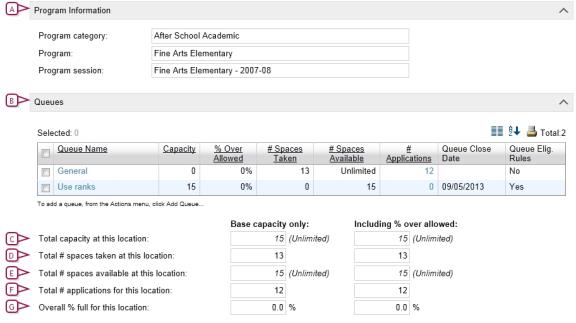
The following figure shows a program session with two queues:
| = | one is a General queue with no capacity restrictions |
| = | the other queue is restricted by eligibility criteria |
Figure 266: Program Queues
| A | Program summary |

www.powerschool.com
Tel: 866-434-6276
Email: smssupport@powerschool.com
Copyright 2015-2016 PowerSchool Group LLC and/or its affiliate(s). All rights reserved. All trademarks are either owned or licensed by PowerSchool Group LLC and/or its affiliates.
