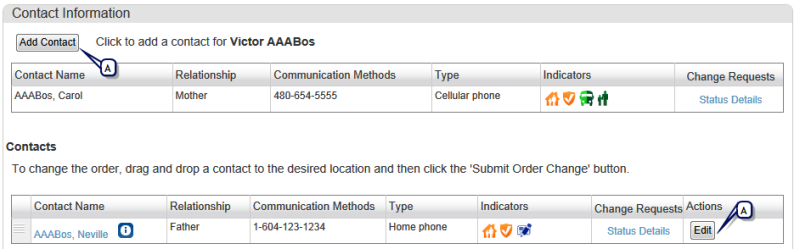
Your school may allow parents and guardians to use ParentCONNECTxp to request changes to the contacts associated with the student. Alternatively, the school may choose to make this information view-only or not available at all. In addition, some contact information such as home and employment addresses may be hidden, view-only, or editable.
If your school makes contact information view-only, you can hover your mouse over the information icon next to the contact name to view address information.
Note: If you do not see buttons to add, edit, or remove contacts in the Contacts list, you are not allowed to make changes for one of the following reasons:
| • | Your school has chosen not to show contact information or not to allow editing in ParentCONNECTxp. |
| • | Your school has not given you permission to make changes. By default, permission is not enabled. Only contacts designated by the school can make changes. |
| • | You are a student. Only parents or guardians (or other appropriate contacts as designated by the school) can submit requests to change contact information. |
| • | If you have access to contact information but you cannot see your home and/or employment address or if you can only view this information, the district has set restrictions on ParentCONNECTxp users' ability to change contact address information. |
If you need to request changes to your information, contact your school.
Figure 4. Contact List with edit permission enabled
| A | These buttons are visible only when you have permission to edit contact information. |
Pearson
Always Learning
www.pearsonschoolsystems.com